
A Fallout 4 update landing next week will see Xbox and PlayStation storage limits being increased for downloading modded Creation content.
Bethesda has announced a massive update to the console versions of Fallout 4. Instead of being a content update or bug fixes though, this is focusing on the extremely limited modding storage that the Xbox and PlayStation consoles have had since the game’s launch. With the update, most consoles will have 15GB of space to grab Creations from the in-game modding hub, while Xbox Series X|S will receive a whopping 100GB.
The studio has been hinting at this storage expansion for some time now, but it’s finally slated to land next week, on May 27.
“We’re excited to share the Fallout 4 Creations storage expansion will arrive for consoles on May 27th. Console players will soon have more space to download content, including larger, more ambitious Creations,” said the studio in a social media post today.
The space that console Fallout 4 players will have for downloading Creations is going up the most on Xbox Series X|S consoles. Starting next week, this will go from the original 2GB limit to a 100GB capacity. Other consoles won’t see such a drastic increase, but it’s still a welcome bump up.
Xbox One, PlayStation 4, and PlayStation 5 console players will see their 1GB or 2GB Creation space limits be increased to about 15GB.
Bethesda also gave a warning to returning players that haven’t played their old save in a while (older than November 10, 2024), saying it’s a good idea to come back now and save the game again on a fresh file before the update. This is due to the update seemingly resetting the load order for mods, which can cause issues.
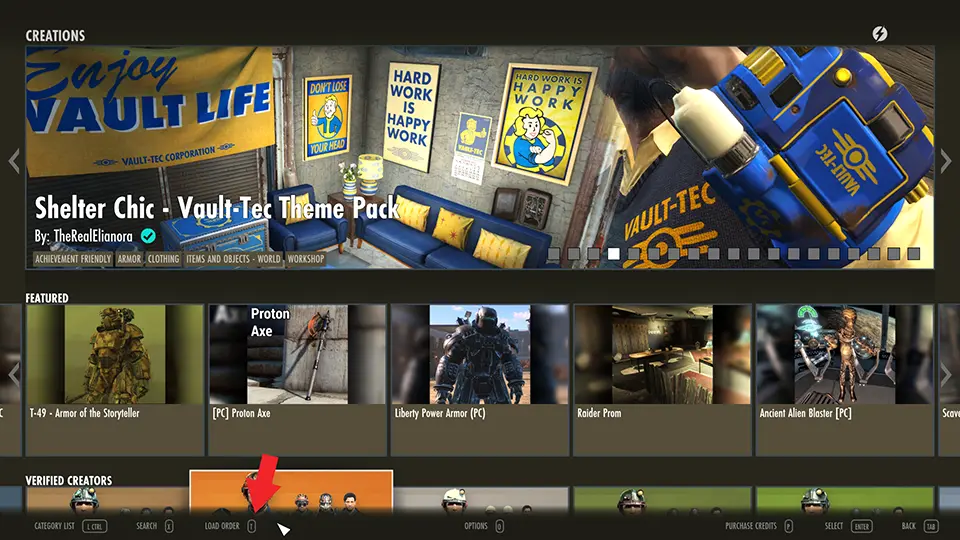
Another method of making sure no issues pop up is to preserve the load order to quickly reload it when needed. To do this, open Fallout 4, head to the Creations Menu, and hit the Load Order Menu button that’s listed on the bottom of the screen. Once this pops up, select the “Load Order Archive” in the same area, which will let players save it to Bethesda.net or quickly restore one from before.

